milliAmpere
This co-simulation demonstrator is a Functional Mock-up Interface (FMI 2.0) version of the autonomy stack of milliAmpere, NTNU’s small autonomous urban passenger ferry. Each ROS node in the original vessel software is re-wrapped as a standalone FMU (built with PythonFMU) around its rospy-free control/plant core, so the same guidance, dynamic positioning (DP), thrust-allocation and vessel-dynamics math runs without a ROS install.
The demonstrator includes eight FMUs, and a short description of these is given in Table 1.
Table 1: List of FMUs in the milliAmpere demonstrator case.
| FMU | Description |
|---|---|
WPManagerFMU | Mission / waypoint manager. Owns the plan and sequences it one leg at a time. |
GuidanceFMU | Adaptive Line-Of-Sight (ALOS) path-following guidance. |
ReferenceFilterFMU | Third-order reference filter that smooths the guidance command into a feasible desired trajectory. |
NavigationFMU | Sensor / kinematics estimator producing the estimated pose and body-frame velocity. |
DPControllerFMU | Dynamic-positioning controller (3-DOF PID + model feedforward). |
ThrustAllocFMU | Thrust allocation mapping the control force to four thruster setpoints. |
VesselFMU | 3-DOF vessel plant (kinetics + propeller/azimuth actuators + wind). |
WindFMU | Absolute-wind environment (Gauss-Markov turbulence + constant mean wind). |
All signals cross the FMI boundary in the NED convention using SI units (metres, radians, m/s). Note that all these FMUs contain Python-based binaries built with PythonFMU 0.6.7.
Availability. The milliAmpere models and FMUs are not shared on this page. Access requires access to the milliAmpere repository. To request access, please contact Miguel Hinostroza at NTNU (miguel.hinostroza@ntnu.no).
System Architecture
The overall model architecture and signal flow between the eight FMUs is shown in Figure 1.
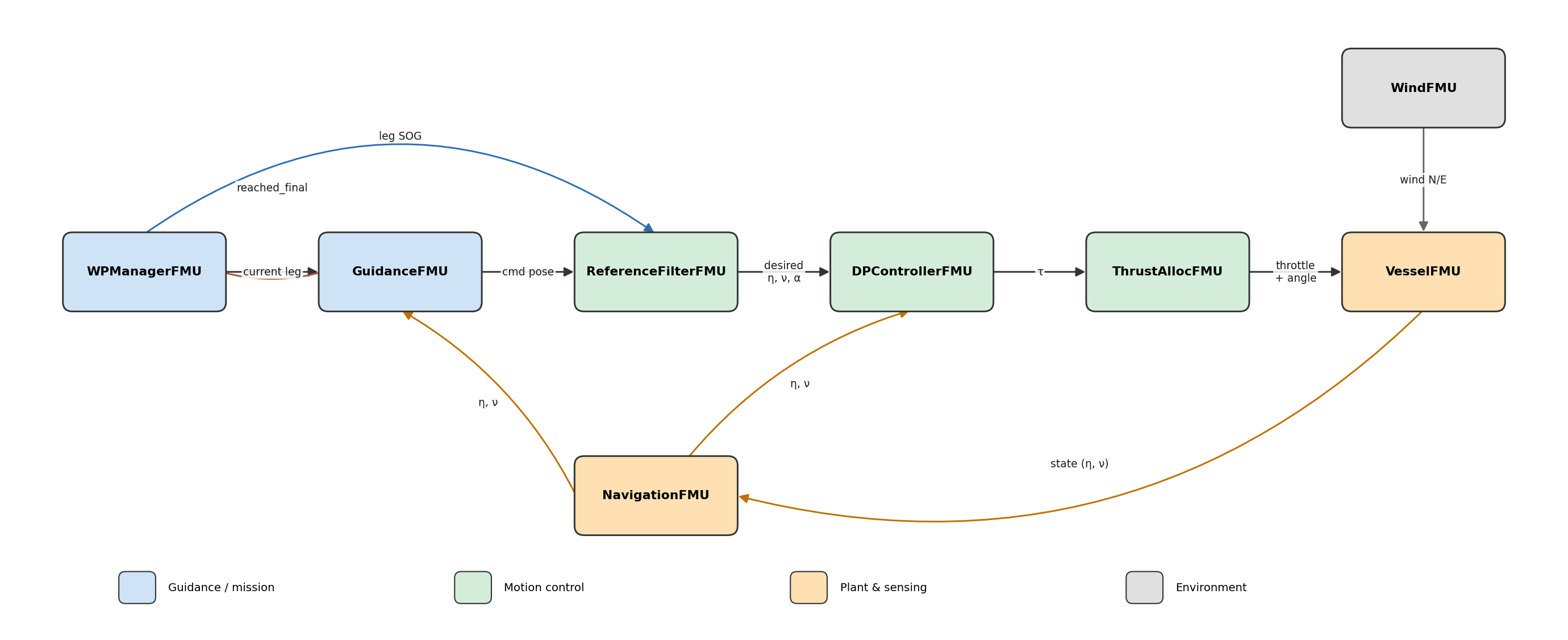
Figure 1: milliAmpere co-simulation model architecture and data flow.
Model Descriptions
In the following, each model in Table 1 is presented with focus on running the demonstrator. In-depth details on the underlying control laws and vessel model are considered out of scope here; the reader is referred to the per-FMU documentation in the repository (cosim/fmus/<name>/README.md) and the references therein.
WPManagerFMU
This FMU owns the mission plan (waypoints, per-leg speed-over-ground, per-leg radius of acceptance) and sequences it. It feeds GuidanceFMU the current leg (wp_curr → wp_next) as Real coordinates and advances to the next leg on the rising edge of Guidance’s reached_final. DP / station-keeping reuses the same pipeline via mode = 'hold' (speed-over-ground = 0, single target). The plan can be replaced at runtime through the waypoints_in string input, which makes the demonstrator interactive from a GUI. The main parameters and I/O are given in Table 2.
Table 2: Main parameters and I/O in WPManagerFMU.
| Name | Type | Causality | Meaning | Default |
|---|---|---|---|---|
waypoints | String | parameter | Plan "n,e;..." (NED) or "lat,lon;..." | 0,0;50,0;50,50 |
default_sog | Real | parameter | Fallback transit speed | 1.0 m/s |
default_acc_distance | Real | parameter | Fallback radius of acceptance | 3.5 m |
auto_start | Boolean | parameter | Begin at t0 vs wait for cmd_start | true |
mode | String | parameter | transit | hold (DP station-keep) | transit |
loop_mission | Boolean | parameter | Restart at wp0 on final | false |
waypoints_in | String | input | Runtime replan (overrides when non-empty) | ”” |
cmd_start/pause/skip/reset | Boolean | input | Mission control (rising-edge) | false |
reached_final | Boolean | input | Guidance reached the current leg end | false |
wp_curr_n/e, wp_next_n/e | Real | output | Current leg endpoints → Guidance | 0.0 m |
leg_sog | Real | output | Current-leg speed → reference filter | 1.0 m/s |
leg_acc_distance | Real | output | Current-leg radius of acceptance → Guidance | 3.5 m |
mission_state | Integer | output | 0 idle, 1 running, 2 paused, 3 done | 0 |
active_leg | Integer | output | Current leg index | 0 |
GuidanceFMU
This FMU runs an Adaptive Line-Of-Sight (ALOS) path-following law: given the estimated pose/velocity and the current leg, it computes along-/cross-track error, an adaptive lookahead distance, an optional cross-track integral and the desired heading, and emits a “carrot” point ref_lookahead metres ahead on the leg line. It handles waypoint switching and a standstill-turn when badly misaligned at low speed. It is implemented in Python and its parameters are user-accessible. The main parameters and I/O are listed in Table 3.
Table 3: Main parameters and I/O in GuidanceFMU.
| Name | Type | Causality | Meaning | Default |
|---|---|---|---|---|
Kp | Real | parameter | Adaptive-lookahead gain | 1e-3 |
Ki | Real | parameter | Cross-track integral gain | 0.0 |
delta_min, delta_max | Real | parameter | Min/max lookahead | 1.0 / 15.0 m |
ref_lookahead | Real | parameter | Reference-filter carrot distance | 20.0 m |
acc_angle | Real | parameter | Acceptance heading tolerance | 10 deg |
docking_mode | Boolean | parameter | Enable docking behaviour | false |
eta_n, eta_e, eta_psi | Real | input | Estimated pose (NavigationFMU) | - m, rad |
nu_u, nu_v, nu_r | Real | input | Estimated body velocity | - m/s, rad/s |
wp_curr_n/e, wp_next_n/e | Real | input | Current leg endpoints (WPManagerFMU) | - m |
acc_distance | Real | input | Radius of acceptance (per-leg, live) | - m |
cmd_n, cmd_e, cmd_psi | Real | output | Commanded pose → reference filter | - m, rad |
cross_track_err, along_track_err | Real | output | Track-error diagnostics | - m |
reached_final | Boolean | output | Reached the leg’s end waypoint → WPManager | false |
ReferenceFilterFMU
This FMU is a third-order nonlinear reference filter (mass-spring-damper with velocity saturation), implemented with casadi. It turns the guidance setpoint (cmd_*) into a smooth, feasible desired pose, velocity and acceleration for the DP controller, with per-axis speed saturation taken from the per-leg speed-over-ground. It is tuned for a fixed design step (internal_step = 0.1 s = 10 Hz). The main parameters and I/O are given in Table 4.
Table 4: Main parameters and I/O in ReferenceFilterFMU.
| Name | Type | Causality | Meaning | Default |
|---|---|---|---|---|
omega_n/e/psi | Real | parameter | Natural frequency per axis | 0.35 / 0.35 / 0.3 rad/s |
zeta_n/e/psi | Real | parameter | Damping ratio per axis | 1.0 |
internal_step | Real | parameter | Fixed design step | 0.1 s |
cmd_n, cmd_e, cmd_psi | Real | input | Commanded pose (GuidanceFMU) | - m, rad |
max_u, max_v, max_r | Real | input | Speed saturations (per-leg SOG, live) | - m/s, rad/s |
des_n, des_e, des_psi | Real | output | Desired pose | - m, rad |
des_*_dot | Real | output | Desired velocity | - m/s, rad/s |
des_*_ddot | Real | output | Desired acceleration | - m/s², rad/s² |
NavigationFMU
This FMU is the sensor / kinematics estimator. It turns the vessel’s true pose into the estimated pose plus body-frame velocity consumed by guidance and the DP controller. It runs in one of two modes: true_state (default) passes the true velocity straight through, while filtered_estimate finite-differences the velocity from consecutive pose samples and smooths it with a first-order low-pass. The main parameters and I/O are given in Table 5.
Table 5: Main parameters and I/O in NavigationFMU.
| Name | Type | Causality | Meaning | Default |
|---|---|---|---|---|
nav_est_mode | String | parameter | true_state | filtered_estimate | true_state |
vel_filter_time_constant | Real | parameter | First-order velocity filter T_f | 0.95 s |
gnss_rate | Real | parameter | Design sample rate (informational) | 20.0 Hz |
north, east, psi | Real | input | True pose (NED + heading) | - m, rad |
u, v, r | Real | input | True body velocity (used in true_state) | - m/s, rad/s |
eta_n, eta_e, eta_psi | Real | output | Estimated pose | - m, rad |
nu_u, nu_v, nu_r | Real | output | Estimated body velocity | - m/s, rad/s |
DPControllerFMU
This FMU is the dynamic-positioning controller. It computes tau = PID(error) + feedforward(reference), where the feedforward uses the vessel inertia + Coriolis + damping model evaluated on the reference velocity/acceleration. The integral term advances in whole design steps of internal_step (0.5 s). It is implemented in Python and the controller gains are user-accessible; the defaults match the simulator gains from config/tunning_PID.dat and it is recommended to leave them as is. The main parameters and I/O are given in Table 6.
Table 6: Main parameters and I/O in DPControllerFMU.
| Name | Type | Causality | Meaning | Default |
|---|---|---|---|---|
Kp_x/y/psi | Real | parameter | Proportional gains | 35 / 20 / 160 |
Kd_x/y/psi | Real | parameter | Derivative gains | 5 / 5 / 1200 |
Ki_x/y/psi | Real | parameter | Integral gains | -0.05 / -0.03 / -0.5 |
tau_i_windup | Real | parameter | Anti-windup clip on integral | ±15 |
internal_step | Real | parameter | Fixed design step (integral) | 0.5 s |
eta_n, eta_e, eta_psi | Real | input | Measured pose (NavigationFMU) | - m, rad |
nu_u, nu_v, nu_r | Real | input | Measured body velocity | - m/s, rad/s |
des_n/e/psi | Real | input | Desired pose (ReferenceFilterFMU) | - m, rad |
des_*_dot, des_*_ddot | Real | input | Desired velocity / acceleration | - m/s, m/s² |
tau_x, tau_y, tau_psi | Real | output | 3-DOF control force (body) | - N, N, Nm |
ThrustAllocFMU
This FMU is the thrust-allocation algorithm (DP mode). It maps the 3-DOF control force from the DP controller to four thruster setpoints (throttle command + azimuth angle). It solves the fixed-angle, non-negative, minimum-thrust allocation as a convex QP (casadi qrqp): the four azimuth angles are fixed at [135, -135, -45, 45] deg so only the four throttle commands vary, matched in a least-squares sense subject to 0 ≤ thrust ≤ Tmax and degrading gracefully at saturation. The main parameters and I/O are given in Table 7.
Table 7: Main parameters and I/O in ThrustAllocFMU.
| Name | Type | Causality | Meaning | Default |
|---|---|---|---|---|
Tmax | Real | parameter | Max single-thruster force | 460 N |
Tmin | Real | parameter | Min single-thruster force | -330 N |
min_rpm, max_rpm | Real | parameter | Throttle command clip | ±960 |
tau_x, tau_y, tau_psi | Real | input | 3-DOF control force, body (DPControllerFMU) | - N, N, Nm |
throttle_ref_1..4 | Real | output | Thruster throttle commands | - command |
angle_ref_1..4 | Real | output | Azimuth setpoints (fixed in DP mode) | - rad |
VesselFMU
This FMU is the simulated boat: a 3-DOF rigid-body plant with propeller/azimuth actuator dynamics and wind forcing (optional quay contact). It integrates the vessel state [N, E, psi, u, v, r, w1..w4, a1..a4] forward one communication step, sub-divided into RK4 sub-steps of at most internal_step (0.02 s = 50 Hz) for numerical stability. The main parameters and I/O are given in Table 8.
Table 8: Main parameters and I/O in VesselFMU.
| Name | Type | Causality | Meaning | Default |
|---|---|---|---|---|
n0, e0, psi0 | Real | parameter | Initial pose | 0 |
command_to_propeller | Real | parameter | Throttle → propeller-speed scaling | 1.0 |
enable_quay | Boolean | parameter | Enable quay contact model | false |
internal_step | Real | parameter | Max internal RK4 step | 0.02 s |
throttle_ref_1..4 | Real | input | Thruster throttle commands (ThrustAllocFMU) | - command |
angle_ref_1..4 | Real | input | Azimuth setpoints | - rad |
wind_n, wind_e | Real | input | Absolute wind velocity (WindFMU) | - m/s |
north, east, psi | Real | output | Pose (NED + heading) | - m, rad |
u, v, r | Real | output | Body velocity (surge, sway, yaw rate) | - m/s, rad/s |
a_1..a_4 | Real | output | Actual azimuth angles | - rad |
tau_x/y/psi | Real | output | Thruster wrench (body) | - N, N, Nm |
WindFMU
This FMU is the absolute-wind environment. Per axis (North/East) it runs a 2nd-order Gauss-Markov steady process plus a 1st-order Gauss-Markov gust process, both driven by white noise, and adds a constant mean wind (mean_speed, mean_dir) on top; the output is mean + steady + gust. Setting mean_speed = 0 with both sigma_* at 0 gives calm conditions. It takes no inputs (self-driving stochastic source). The main parameters and I/O are given in Table 9.
Table 9: Main parameters and I/O in WindFMU.
| Name | Type | Causality | Meaning | Default |
|---|---|---|---|---|
mean_speed | Real | parameter | Constant mean wind speed (0 ⇒ zero-mean) | 0.0 m/s |
mean_dir | Real | parameter | Mean wind heading, North→East [0–360] | 0.0 deg |
sigma_steady | Real | parameter | Steady std-dev (0 ⇒ no steady wind) | 0.0 |
sigma_gust | Real | parameter | Gust std-dev (0 ⇒ no gusts) | 0.0 |
beta_steady | Real | parameter | Steady process rate | 0.01 /s |
beta_gust | Real | parameter | Gust process rate | 10.0 /s |
seed | Integer | parameter | RNG seed (< 0 ⇒ unseeded) | -1 |
wind_n | Real | output | Absolute wind, North component | 0.0 m/s |
wind_e | Real | output | Absolute wind, East component | 0.0 m/s |
Model Connections
In this demonstrator case, the model connections are given as follows:
WPManagerFMU.wp_curr_n/e       ->  GuidanceFMU.wp_curr_n/e
WPManagerFMU.wp_next_n/e       ->  GuidanceFMU.wp_next_n/e
WPManagerFMU.leg_acc_distance  ->  GuidanceFMU.acc_distance
WPManagerFMU.leg_sog           ->  ReferenceFilterFMU.max_u

NavigationFMU.eta_n/e/psi      ->  GuidanceFMU.eta_n/e/psi
NavigationFMU.nu_u/v/r         ->  GuidanceFMU.nu_u/v/r

GuidanceFMU.cmd_n/e/psi        ->  ReferenceFilterFMU.cmd_n/e/psi
GuidanceFMU.reached_final      ->  WPManagerFMU.reached_final

ReferenceFilterFMU.des_*       ->  DPControllerFMU.des_*
NavigationFMU.eta_n/e/psi      ->  DPControllerFMU.eta_n/e/psi
NavigationFMU.nu_u/v/r         ->  DPControllerFMU.nu_u/v/r

DPControllerFMU.tau_x/y/psi    ->  ThrustAllocFMU.tau_x/y/psi

ThrustAllocFMU.throttle_ref_*  ->  VesselFMU.throttle_ref_*
ThrustAllocFMU.angle_ref_*     ->  VesselFMU.angle_ref_*
WindFMU.wind_n/e               ->  VesselFMU.wind_n/e

VesselFMU.north/east/psi       ->  NavigationFMU.north/east/psi
VesselFMU.u/v/r                ->  NavigationFMU.u/v/r
The full wiring is defined in cosim/system/OspSystemStructure.xml (50 signal edges across the 8 FMUs). The same coupled system can also be run without OSP using the bundled FMPy driver (cosim/system/run_fmpy_cosim_headless.py), or streamed to a browser GUI for live monitoring and interaction (cosim/system/run_fmpy_cosim_gui.py).
Running the demonstrator
Set up the dev environment (Python 3.11) and build the FMUs:
pip install -r cosim/requirements-dev.txt
cd cosim/fmus/<name> && ./build.sh    # per FMU, outputs to cosim/build/
Pre-built FMUs are also shipped in cosim/build/*.fmu, so the system can be loaded directly in the OSP cosim command-line tool / demo application from OspSystemStructure.xml, or run with the bundled driver scripts.
The repository provides four ready-to-use ways to run the full coupled system, combining two engines (native OSP / libcosim or FMPy) with two front-ends (headless console or the milliAmpere browser GUI). All four drive the same OspSystemStructure.xml wiring, so the results match.
| # | Engine | Mode | Command |
|---|---|---|---|
| 1 | FMPy | headless | python cosim/system/run_fmpy_cosim_headless.py |
| 2 | FMPy | browser GUI | python cosim/system/run_fmpy_cosim_gui.py |
| 3 | OSP / libcosim | headless | python cosim/system/run_osp_cosim_headless.py |
| 4 | OSP / libcosim | browser GUI | python cosim/system/run_osp_cosim_gui.py |
- Headless drivers (1, 3) print the vessel state to the console — for batch runs and quick validation.
- Browser GUI drivers (2, 4) serve the milliAmpere web dashboard at
http://127.0.0.1:5000/, where FMU outputs are visualised live (monitor) and a mission can be replanned interactively by setting a waypoint (interact). - The OSP drivers run through the native OSP engine via the
libcosimpypackage (which bundles the libcosim binaries:pip install libcosimpy) — the scripted equivalent ofcosim run cosim/system/OspSystemStructure.xml. The FMPy drivers need only the pip dependencies incosim/requirements-dev.txtand run anywhere the FMUs build.
References
[1] E. F. Brekke, E. Eide, B.-O. H. Eriksen, E. F. Wilthil, M. Breivik, et al., “milliAmpere: An Autonomous Ferry Prototype,” Journal of Physics: Conference Series, vol. 2311, 012029, 2022. https://doi.org/10.1088/1742-6596/2311/1/012029
[2] T. I. Fossen, Handbook of Marine Craft Hydrodynamics and Motion Control, 2nd ed., Wiley, 2021.
[3] PythonFMU — https://github.com/NTNU-IHB/PythonFMU
[4] FMPy — https://github.com/CATIA-Systems/FMPy
[5] Open Simulation Platform — https://open-simulation-platform.github.io/